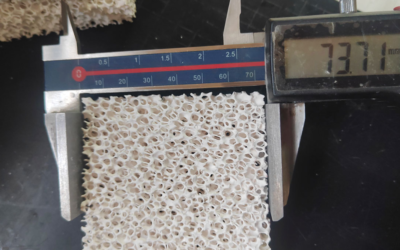
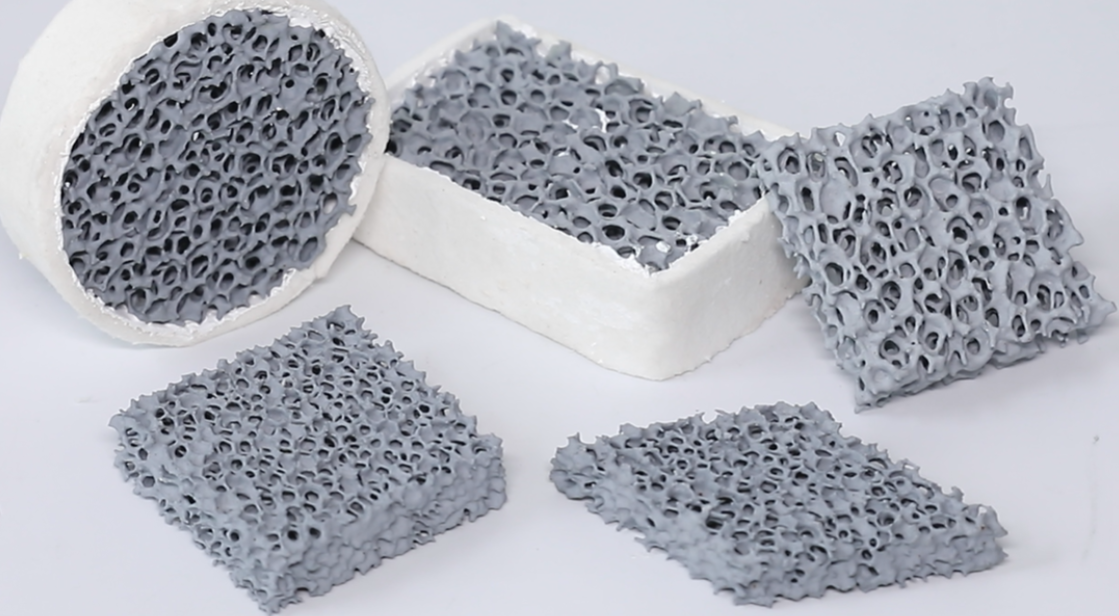
A single undersized ceramic foam filter can turn a routine pour into a scrap-bin disaster—slow filling, cold laps, or a burst filter mid-pour that dumps unfiltered metal straight into your mold. On the flip side, oversizing wastes money and can actually slow your fill rate below where you want it. Choosing the right casting filter size requires a straightforward calculation. Pour weight, target filling time, flow velocity, and alloy type feed into that calculation to give you the exact face area and PPI rating you need. You’ll work through it step by step: first figure out your metal volume, then select the correct pore size for aluminum versus iron. That way you can stop relying on “what worked last time” and start specifying filters with real engineering confidence.
Why Casting Filter Size Selection Matters
Filter selection is a balancing act, and most foundries get the balance wrong in one direction or the other. Push PPI too high and you get excellent inclusion removal, but the pressure drop climbs fast. Go too low and the metal flows freely, but oxide films, sand grains, and fine particulates sail right through.

The PPI-to-Application Trade-off
|
PPI Range |
Flow Characteristics |
Best Application |
|---|---|---|
|
10–15 PPI |
High flow, low pressure drop |
Iron castings, heavy-gauge gravity pours |
|
15–20 PPI |
Balanced flow and retention |
General-purpose aluminum castings |
|
20–30 PPI |
Finer filtration, moderate resistance |
Thin-wall parts, detailed geometries |
|
30–50 PPI |
Maximum cleanliness, high resistance |
Billet/ingot casting, premium alloys |
For aluminum Ceramic foam Filters, initial pressure drop runs 1.5–3.5 kPa at standard flow rates. Undersize the filter area or push PPI too fine, and that number climbs fast—sometimes past the point where the metal can’t push through quickly enough.
Where the Defects Come From
-
Inclusions trace back to filters selected too coarse for the job.
-
Porosity often follows turbulent, restricted flow through an undersized filter.
-
Misruns and cold shuts are the classic symptom of a filter that’s choked the fill rate.
Once ΔP exceeds your gating system’s threshold, scrap rates, rework, and cleaning time all climb together. The filter geometry never matched the pour.
Step 1: Calculate Total Pour Weight & Metal Volume
Most sizing errors start when engineers calculate filter size based on casting weight alone, then wonder why the Gating System chokes mid-pour. Total pour weight includes far more than the finished part.
The formula that matters:
-
Total Pour Weight (W_total) = W_casting + W_gating + W_riser
-
Total Metal Volume (V_total) = V_casting + V_gating + V_riser
-
Pour Weight = Metal Density (ρ) × V_total
Don’t stop there. Vents, mixing cup hold-up, and scrape allowance all eat into your real metal volume. Skip them, and your filter permeability calculations will run short.
Watch for These Two Costly Mistakes
-
Double-counting connector segments that get cut off after casting. Those aren’t part of your actual metal volume.
-
Overlapping riser contact pads with casting volume, inflating your total.
Real numbers from the field: One casting case showed gating + riser system weighing 0.285 kg total (riser: 0.015 kg, gating: 0.27 kg). Another logged a 38.5 kg casting requiring 55 kg total pour weight—a casting yield around 70%. Industry benchmarks land between 70–88% yield, depending on your riser-to-casting ratio.
For multi-cavity molds, the math shifts: V_total = n × V_cavity + V_common_gating + ΣV_local_gates/risers. Shared runners get missed constantly. Don’t let that happen to your gating system design.
Step 2: Determine Target Filling Time
Calculate your target filling time, then verify it. Set it too long, and the metal front cools before it fills the cavity. Set it too short, and you get turbulence, air entrapment, and inclusion pickup. Most foundries start with published empirical ranges, then run simulation software (MAGMA, ProCAST, AnyCasting) to tighten the number.
Empirical Values vs. Simulation
Empirical charts give you a fast starting point—useful for early quoting and gating system design screening. They depend heavily on wall thickness, mold temperature, and alloy state, so they don’t transfer well between products.
Simulation gives you cavity-by-cavity filling time, front temperature, and flow balance. It costs more setup time upfront (geometry, material data, boundary conditions) but is the only way to confirm your target works across the full part.
Set an initial target from empirical data, then let simulation close the gap.
Aluminum Filling Time Benchmarks
aluminum die casting happens in milliseconds.
-
2 mm wall thickness aluminum castings – 15–20 ms is the common target
-
General thin-wall aluminum (1–6 mm) – target range of 12.5–75 ms
-
Gate velocity for aluminum – 25–70 m/s, which drives these short fill windows
If your part has any section thinner than 2 mm, that section sets the target, not the average wall thickness.
Iron and Steel Filling Time Benchmarks
Iron and steel castings carry more thermal mass, so they tolerate longer fill windows—seconds in sand or Gravity casting.
-
Some iron-based and high-temperature alloy castings report fill times in the 3–5 second range
-
Keeping fill time under 4 seconds reduces misrun risk in these cases
-
Steel castings, given oxidation sensitivity at high pour temperature, often need custom targets in the several-second to low-teens-second range, set initially and confirmed by simulation
Practical Rules for Setting Your Target
-
Aluminum thin-wall (1–2 mm) → start at 15–20 ms
-
Aluminum general thin-wall (1–6 mm) → start at 12.5–75 ms
-
Iron/steel castings → start with a second-level window, then check whether filling completes before the front cools, air entrains, or dross forms
-
Variable wall thickness parts → let the thinnest section set your target, then simulate the thick-to-thin transition zones for cold shut risk
-
Multi-cavity molds → aim for the smallest difference in fill time across cavities. Simulation should optimize for that.
Get this number right before you move to filter permeability calculations. Everything downstream (your Ceramic foam filter’s pore size, face area, and pores per inch rating) gets sized against this target filling time, not against pour weight alone.
Step 3: Calculate Flow Rate & Select Target Velocity
Divide total metal volume by your target filling time and you get volumetric flow rate. Convert that number to mm³/s and it drives everything else — filter area, PPI rating, gating system design.
The formula:
Volume (cm³) ÷ Fill Time (s) = Flow Rate (cm³/s). Multiply by 1,000 to get mm³/s. Then divide by target velocity (mm/s) to get minimum filter face area.
Worked example: A 12,000 cm³ casting plus gating system with a 6-second fill time gives 2,000 cm³/s, or 2,000,000 mm³/s. At a 30 mm/s target velocity, minimum filter area is 66,667 mm² — roughly a 258 × 258 mm square. Round up to the next standard filter size.
Target Velocity by Alloy and Filter Type
|
Alloy / Metal Family |
Filter Type / PPI |
Target Velocity |
Typical Use Case |
|---|---|---|---|
|
Aluminum alloys |
Al₂O₃ 30 PPI |
25–40 mm/s |
Structural castings, cylinder blocks, pressure-tight parts |
|
Iron alloys |
SiC 20 PPI |
30–50 mm/s |
Grey iron, ductile iron, heavy foundry pours |
|
Aluminum alloys |
40 PPI |
20–35 mm/s |
Higher filtration, lower flow rate applications |
|
Aluminum alloys |
50 PPI |
15–30 mm/s |
Fine filtration, slower fill, cleaner melt |
|
General aluminum |
30 PPI |
~10 mm/s |
Research-based laminar-flow benchmark |
Higher PPI means smaller pores and lower allowable velocity. Lower PPI means bigger pores and higher throughput.
Pick 30 PPI Al₂O₃ when inclusion control matters but fill speed still needs to stay moderate to high — automotive structural parts, cylinder blocks, aerospace components. Pick 20 PPI SiC when throughput takes priority, especially for iron streams and thicker sections like grey iron, Ductile Iron, and heavy copper alloy pours.
No exact casting data on hand? Fall back on the 10 mm/s hydraulic benchmark for general aluminum filtration, or the 25–40 mm/s range for 30 PPI grades.

Step 4: Calculate Minimum Filter Face Area & Select Standard Size
The math from Step 3 gives you a number. Now you need to turn that number into an actual part you can order. The formula stays simple: A_min = (M/t) / G, where M is pour weight, t is fill time, and G is the allowable flow rate per unit area. Once you land on A_min, the rule is fixed. Always round up to the next standard size. Never select a filter that sits right at your calculated minimum. Foundries that shave margin here are the ones calling back about porosity three weeks later.
Pour Weight Lookup Table
|
Standard Filter Size |
Max Pour Weight (Carbon Steel) |
Max Pour Weight (Stainless) |
Recommended Flow Rate |
|---|---|---|---|
|
50 × 25 mm |
88 kg |
133 kg |
9.3–13.2 kg/s |
|
50 × 50 × 25 mm |
50 kg |
75 kg |
5.3–7.5 kg/s |
|
75 × 25 mm |
157 kg |
236 kg |
16.5–23.6 kg/s |
|
75 × 75 × 25 mm |
200 kg |
300 kg |
21–30 kg/s |
|
100 × 100 × 25 mm |
39 kg |
59 kg |
4.1–5.9 kg/s |
Don’t just eyeball this table. Cross-check it against your flow rate math. Below 10 kg pour weight, 50 × 25 mm or smaller usually covers you. Push past 200 kg and you’re in 75 × 75 × 25 mm territory or larger.
Flow Rate Lookup Table
|
Metal Flow Rate |
Standard Filter Size Range |
|---|---|
|
≤2 t/h (≈0.56 kg/s) |
50 × 25 mm or smaller |
|
2–4 t/h |
50 × 25 mm to 50 × 50 × 25 mm |
|
4–8 t/h |
50 × 50 × 25 mm or 75 × 25 mm |
|
8–12 t/h |
75 × 25 mm to 75 × 75 × 25 mm |
|
>12 t/h |
75 × 75 × 25 mm or larger |
Three Checks Before You Finalize
Face area alone doesn’t confirm your selection. Run all three before you lock in a standard size:
-
Filter face area ≥ your calculated A_min: the non-negotiable floor.
-
Gate-to-filter ratio meets alloy requirements: aluminum and copper alloys want a minimum 4:1 ratio, grey iron sits at 3:1–5:1, ductile iron needs 5:1–7:1.
-
Exit support area equals roughly 30% of front face area. Undersized support chokes flow right after the filter, negating everything you just calculated.
If you’re sizing off choke area instead of pour weight, foundry practice says the filter’s front face should measure 3.0–4.5 times the choke area as a baseline, with some suppliers recommending 5–7 times depending on alloy and filter material. Lock in the standard size that clears every one of these checks; not just the biggest number on your spreadsheet.
Step 5: Choose the Right PPI (Pores Per Inch) for Your Alloy
Alloy family gets you in the right neighborhood. Wall thickness and casting weight get you to the right house. Skip that second step, and you’re guessing.
10 PPI handles large, high-throughput pours — ductile iron, big Gray Iron, steel castings, primary aluminum ingots. Flow resistance stays low. 20 PPI is the workhorse middle ground: general aluminum, gray iron, ductile iron, heavy copper alloys, standard automotive parts. 30 PPI is the aluminum default for sand and permanent mold castings and structural automotive parts. 30 to 60 PPI covers precision castings, thin-wall parts, and aerospace components where particle capture matters more than flow rate.
|
Alloy |
Typical PPI |
|---|---|
|
Ductile iron (thin-wall) |
20–30 |
|
Ductile iron (large/heavy) |
10 |
|
Gray iron |
10–20 |
|
Steel/stainless |
10–20 (thin-wall: 15–20) |
|
Copper alloys |
20 |
|
Aluminum general |
30 |
|
Aluminum thin-wall/high-finish |
40–60 |
Don’t pick PPI by alloy alone. Same alloy with a different wall thickness or pour volume needs a different PPI. Thicker filters at the same PPI increase filtration volume and resistance too, so thickness belongs in your spec.
Step 6: Verify Filter Seat, Thickness & Orientation
Face area and PPI mean nothing if the filter doesn’t seat correctly. Common thicknesses are 1 in, 2 in, 4 in, and 5 in. As rough engineering approximations, a 3×2 in filter uses ~1/5 in for a shallow inset seat, a 4×4 in filter uses ~1/3 in for a medium-depth seat, and larger sizes need ~1/2 in for high-flow applications.
Thickness directly affects flow resistance. Thicker media raises the pressure drop, but it also spreads the particulate load across more depth. Front layers catch coarse material; back layers catch fine. This reduces surface clogging and instantaneous head loss at high flow rates.
Final Checklist
Check that the seat depth matches the filter thickness exactly. Don’t force a thinner or thicker substitute. The flow arrow should align with the gating system design direction. The filter must sit flush, with no gaps or warping. For high flow rate pours, consider thicker, larger-area filters to control pressure drop.
Quick Reference: Filter Size by Pour Weight & Throughput
Skip the formulas when you’re standing at the pour station with a work order in hand. This table gets you a starting filter size using pour weight and throughput.
|
Pour Weight |
Typical Filter Size |
Capacity Range |
Flow Rate |
Notes |
|---|---|---|---|---|
|
Under 10 kg |
40×40 mm, Φ50 mm |
30–70 kg |
2–4.5 kg/s |
Small parts, short pours |
|
10–25 kg |
50×50 mm, Φ60 mm |
40–100 kg |
3–6.5 kg/s |
General small/mid parts |
|
25–50 kg |
75×75 mm, 100×50 mm, Φ70–80 mm |
75–200 kg |
5.5–12 kg/s |
Mid-volume pours |
|
50–100 kg |
100×100 mm, 150×100 mm, Φ90–100 mm |
140–400 kg |
11–24 kg/s |
Watch pressure drop |
|
100–200 kg |
150×150 mm, Φ120–150 mm |
300–900 kg |
15–54 kg/s |
Large parts, high flow |
|
Over 200 kg |
Multi-filter or custom filter box |
900 kg+ (combined) |
Multi-filter above 12 t/h |
Requires engineering review |
Cross-Check by Throughput
Lock in pour weight first, then verify against throughput. Filter area needs to clear the choke, not just match the pour.
-
≤2 t/h → 200–400 cm², 7″×7″
-
2–6 t/h → 400–800 cm², 9″×9″ to 12″×12″
-
6–12 t/h → 800–1,500 cm², 15″×15″ or parallel filters
-
>12 t/h → 1,500+ cm² or custom multi-filter box
The Six-Step Lookup Sequence
-
Weight → 2. Throughput → 3. Filter area → 4. Alloy correction → 5. Safety margin → 6. Parallel filters if needed
Once you have a candidate size, you apply CoorsTek’s alloy ratios. For gray iron it’s 3:1–5:1, aluminum/copper 4:1, and ductile iron 5:1 (filter:choke). Then add a 30–50% safety factor on top of the base area. It compensates for wetting delay and progressive clogging that the raw numbers don’t capture. Past 6 t/h, single filters stop scaling. Parallel arrangements become standard practice.
Common Mistakes to Avoid (Common Errors in Selection)
Every one of these mistakes traces back to a shortcut. Skip a step, and the filter looks right on paper but fails on the floor.
Ordering by alloy alone tops the list. Alloy type gets you started, nothing more. Wall thickness matters just as much. Thin-wall castings need a coarser PPI, not finer, or the metal stalls before it fills.
Undersized face area paired with high PPI is a pressure-drop trap. Push both variables the wrong direction at once, and resistance climbs while filter life drops. When area falls short, widen the filter first. Drop the PPI second. Don’t do both wrong at the same time.
Installation errors kill good filters. Flow arrows exist for a reason—point them toward the gating system, not away from it. Mismatched seat dimensions cause gaps, bypass flow, or filters that never seat flush.
Skipping validation is the quiet killer. PPI charts predict performance; they don’t guarantee it. Run inclusion counts before and after. Trial-pour before committing to volume. Measure actual pressure drop against budget. That four-point check catches what the spec sheet misses.
Best Practice Recommendations
Start every aluminum project at 20–30 PPI. That range balances flow and inclusion capture for general and automotive castings, and it gives you room to adjust after real data comes in—not before.
Work the validation loop in order: set cleanliness targets, measure flow rate and pour cadence, assess incoming melt inclusion load, pick initial PPI, check filter area, verify pressure and fill, then retest final metal cleanliness before locking production.
When throughput runs high or repours are frequent, widen the filter area first. Jumping straight to finer PPI raises pressure drop before you’ve confirmed the system can fill. Moving from 20 to 30 PPI usually calls for a modest area increase to hold acceptable pressure loss.
5xxx (Al-Mg) alloys oxidize faster, so stick with 20–30 PPI to avoid premature clogging.
Preheat filters to 300–600°C, matched to melt temperature and pour timing, and confirm the seat sits flush with zero bypass gaps.

Conclusion
Getting your casting filter size right takes math, alloy knowledge, and a bit of discipline. Run the numbers on pour weight and flow rate, match your ceramic foam filter’s PPI to your alloy, and verify the filter seat before you ever pour metal. Skip these steps, and you’re gambling with scrap rates, rework, and blown production schedules.
The foundries that ship clean, inclusion-free castings have built filter selection into their standard gating system design process instead of leaving it to trial and error on the shop floor.
Don’t let a $2 filter mistake cost you a $2,000 casting. Pull your last three job specs, run them through the calculations in this guide, and cross-check against our quick reference table. If the numbers don’t add up or you’re still unsure which PPI or mesh fits your specific pour, talk to FoundryMax‘s engineering team—we’ve solved this exact problem for foundries pouring everything from small aluminum parts to heavy iron castings.